
|
|
||||||||
|
|||||||||
|
|||||||
| Fixed Geek Squad Rescued These Threads |
 Flame graphics turning black
|
|
Login or Register now to see less ads. |
|
|
Thread Tools | Display Modes |
|
#1
 04-08-2009, 07:38 PM
|
||||
|
||||
|
Flame graphics turning black
Whether I've mentioned this before or not I'd like to ask how to get rid of the black graphics as seen in the picture below.
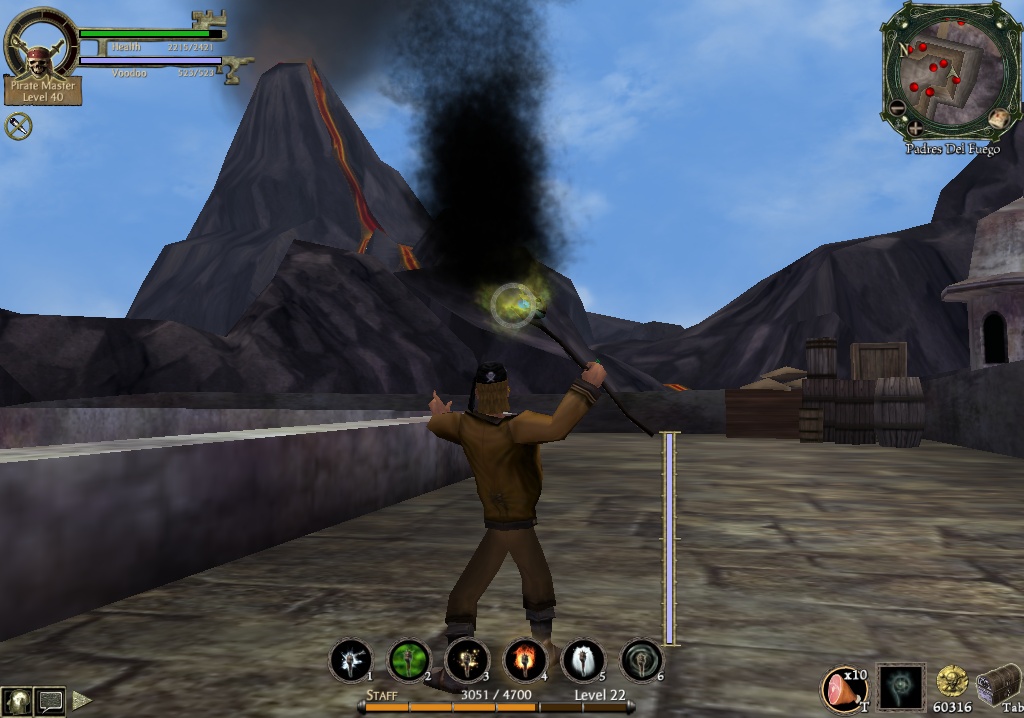 I can't use anything that should be on fire without the graphics being black. How do I stop this without changing any of my graphic settings? |
|
#2
04-08-2009, 07:53 PM
|
||||
|
||||
|
Quote:
|
|
#3
04-08-2009, 08:16 PM
|
||||
|
||||
|
This happens to me when I use DX8. They are red/orange with DX9. Of course, all the girls' faces are black with DX9, so I take the black flames m'self. I just say it's smoke....
__________________
Go ahead; click the signature--you know you want to....
 Signature courtesy of Nautical Nattie |
|
#5
04-08-2009, 11:07 PM
|
||||
|
||||
|
The way I got mine to work was to make sure that my Shader Level (mine is Shader Level 4*)was turned on in Graphics Options (I use DX9 - and all fire to me was black until I turned this option on - you do need to exit the game and restart it once you save the option).
Hope that helps 
|
|
#6
04-08-2009, 11:14 PM
|
||||
|
||||
|
Hmmm... might try some shader adjustments so I can see all the Krewe's lady-faces.
Not that all the Krewe has lady-faces mind ye.....
__________________
Go ahead; click the signature--you know you want to....
Signature courtesy of Nautical Nattie |
|
|




















 Linear Mode

