
|
|
||||||||
|
|||||||||
|
|||||||
| Fixed Geek Squad Rescued These Threads |
 How do I take a in game screenshot?
|
|
Login or Register now to see less ads. |
|
|
Thread Tools | Display Modes |
|
#1
 03-14-2009, 05:22 PM
|
||||
|
||||
|
Graphic problem with cannons...
For a while now, anytime I use the cannon all my Firebrand amo shots appear to be black instead of flaming like they should.
Is there a graphic option I might have turned off for that or... EDIT: Also, here's a picture of what happens when my ship battles a ship that has a graphic issue. 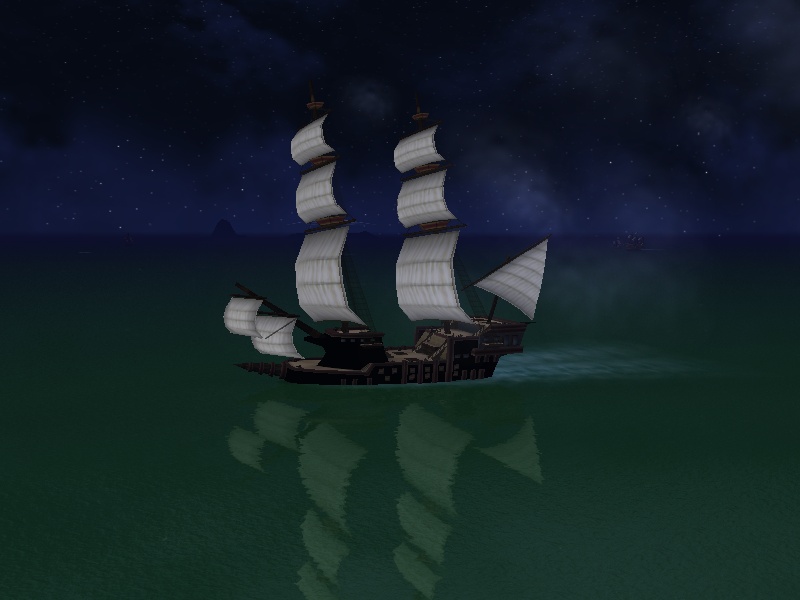 First my amo turned black and now my ship.(but it only happens to things where flames would be.) On the other hand if this can't be fixed I get to have a nice, scary looking ship like I've wanted from day one. |
|
#2
03-14-2009, 05:37 PM
|
||||
|
||||
|
I think it may have something to do with your special effects. They show up just regular when you have it on low.
|
|
#3
03-14-2009, 05:39 PM
|
||||
|
||||
|
There have been multiple issues since these last few updates. What OS are you running? I don't have the issue you described but do have several other wonderful block like graphics and distortion in some portions of the game.

__________________
Signature Compliments of Senior Officer Mia Lightning
|
|
#4
03-14-2009, 06:09 PM
|
||||
|
||||
|
This happened to me are you using full screen? If not use it, that solved my problem. And it has to be directx 9 not 8 or it will not work.
Last edited by Nicholasfunstuff; 03-14-2009 at 06:12 PM.. Reason: Changed somethings |
|
#5
03-14-2009, 06:42 PM
|
||||
|
||||
|
Quote:
I'm not a really big computer person. I haven't had this graphic issue with anything besides the flame shot and the hull of ships. I have all my graphics set to high. Also, I just sent a bug report incase I can't manually fix it. |
|
#6
03-14-2009, 11:16 PM
|
||||
|
||||
|
You seem to be better off than me... this is what my ships have looked like since the Port Royal updates. They seem to show reflections of in-game graphics and even my dock or other programs I have running. You can see Firefox in the ship below...

|
|
#7
03-15-2009, 12:49 AM
|
||||
|
||||
|
I believe I have had the black smoke looking Firebrand when I have tried using the Directx 9 type of graphics. Using OpenGL I don't see that issue.
At the login screen there is a button at the bottom labeled Graphics. Click that and see what you have selected and try changing it and see if that helps. |
|
#8
03-15-2009, 12:53 AM
|
||||
|
||||
|
Quote:
|
|
#9
03-15-2009, 03:14 AM
|
||||
|
||||
|
I guess i'm lucky... My graphics don't have problems.

|
|
#10
03-15-2009, 03:55 AM
|
||||
|
||||
|
Here's what I got back after reporting the bug.
I sent the log files but I guess they had a problem getting them. Quote:
|
|
|



















 Linear Mode

