
Pirates of the Caribbean Online Fansite & Forums

Pirates of the Caribbean Online Fansite & Forums (https://www.piratesonlineforums.com/forums/index.php)
-   Fixed (https://www.piratesonlineforums.com/forums/forumdisplay.php?f=68)
-   -   Graphic problem with cannons... (https://www.piratesonlineforums.com/forums/showthread.php?t=10799)

MacIronhawk 03-14-2009 05:22 PM

Graphic problem with cannons...
 
For a while now, anytime I use the cannon all my Firebrand amo shots appear to be black instead of flaming like they should.
Is there a graphic option I might have turned off for that or...

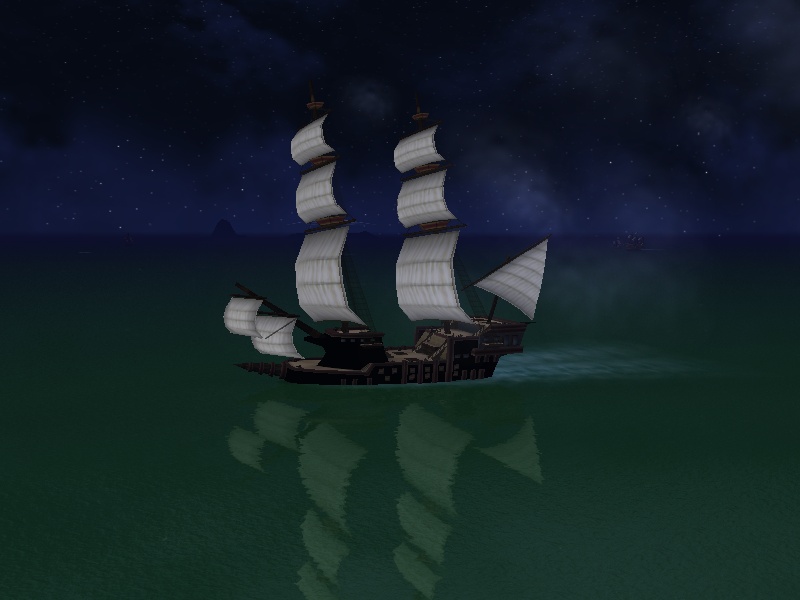
EDIT: Also, here's a picture of what happens when my ship battles a ship that has a graphic issue.
Click the image to view the full version

First my amo turned black and now my ship.(but it only happens to things where flames would be.)

On the other hand if this can't be fixed I get to have a nice, scary looking ship like I've wanted from day one.

Andrew 03-14-2009 05:37 PM

I think it may have something to do with your special effects. They show up just regular when you have it on low.

akamystic 03-14-2009 05:39 PM

There have been multiple issues since these last few updates. What OS are you running? I don't have the issue you described but do have several other wonderful block like graphics and distortion in some portions of the game.


:mybadki6:

Nicholasfunstuff 03-14-2009 06:09 PM

This happened to me are you using full screen? If not use it, that solved my problem. And it has to be directx 9 not 8 or it will not work.

MacIronhawk 03-14-2009 06:42 PM

Quote:

Originally Posted by akamystic (Post 122357)
There have been multiple issues since these last few updates. What OS are you running? I don't have the issue you described but do have several other wonderful block like graphics and distortion in some portions of the game.

To tell you the truth I have no idea what an OS is.
I'm not a really big computer person.

I haven't had this graphic issue with anything besides the flame shot and the hull of ships.
I have all my graphics set to high.

Also, I just sent a bug report incase I can't manually fix it.

jason davy 03-14-2009 11:16 PM

You seem to be better off than me... this is what my ships have looked like since the Port Royal updates. They seem to show reflections of in-game graphics and even my dock or other programs I have running. You can see Firefox in the ship below...

http://i55.photobucket.com/albums/g1...Picture2-2.png

Will Badbreaker 03-15-2009 12:49 AM

I believe I have had the black smoke looking Firebrand when I have tried using the Directx 9 type of graphics. Using OpenGL I don't see that issue.
At the login screen there is a button at the bottom labeled Graphics. Click that and see what you have selected and try changing it and see if that helps.

jason davy 03-15-2009 12:53 AM

Quote:

Originally Posted by Will Badbreaker (Post 122504)
I believe I have had the black smoke looking Firebrand when I have tried using the Directx 9 type of graphics. Using OpenGL I don't see that issue.
At the login screen there is a button at the bottom labeled Graphics. Click that and see what you have selected and try changing it and see if that helps.

Unfortunately, for Macs, OpenGL is the only option, and my graphics are still bizarre.

The Commodore 03-15-2009 03:14 AM

I guess i'm lucky... My graphics don't have problems. :smiley57:

MacIronhawk 03-15-2009 03:55 AM

Here's what I got back after reporting the bug.
I sent the log files but I guess they had a problem getting them.

Quote:

Thank you for your bug report to Pirates of the Caribbean Online. We're sorry to learn that you've been having difficulty with the game.

We did receive your launcher log files, but for some reason, your game log files were not sent with your bug report. Will you please send us the game log files manually so we can attempt to diagnose your problem?

To access your game log files, complete the following:

•Go to the Windows Start | All Programs | Accessories | Windows Explorer
•Navigate to C:\Program Files\Disney\Disney Online\PiratesOnline
•Look for pirates-<set of numbers>.log (ex: pirates-070523_093633.log)
•Copy and paste the text of the newest log files in your response to this e-mail

We will review your log files and get back to you as soon as possible.

Thanks again for your email and we look forward to seeing you soon in Pirates of the Caribbean Online.


All times are GMT. The time now is 12:55 AM.

Powered by vBulletin® Version 3.8.11
Copyright ©2000 - 2026, vBulletin Solutions Inc.