POTC Fansite Home POTCF Forums POTCF Gallery Blogs POTCF Arr!cade POTCF User Pages Register! Casino!

Go Back   Pirates of the Caribbean Online Fansite & Forums > Other > Creative Coffers > Creative Coffers Archive
Blogs FAQDonate Calendar Arcade

Creative Coffers Archive Creative Coffers Archive Forum

Old Transparent Avatar?

Login or Register now to see less ads.


Thread Tools Display Modes
  #1  
Old 08-17-2009, 05:28 PM
Erich Uchiha's Avatar
Erich Uchiha Erich Uchiha is offline
PNC Circle Of Trust Rep
Erich Uchiha's Primary Pirate Info

Join Date: Jun 2008
Location: The Caribbean, luv!
Posts: 642
My Mood: JarODirt
Erich Uchiha is scurvy dog
Transparent Avatar?

I've been trying to figure out how to get transparent avatars, im using GIMP to make my images my current avatar was made by GIMP. And I turn the backround to transparent but when I upload it to the site (Avatar Part) the transparent backround shows up as white, can someone help me out? i've tried saving the image as a PNG file & a GIF image.
  #2  
Old 08-17-2009, 09:33 PM
Davy Keelhawk's Avatar
Davy Keelhawk Davy Keelhawk is offline
BBK's own Cliff Diver
Davy Keelhawk's Primary Pirate Info

Join Date: Apr 2009
Location: In the Kraken's stomach
Posts: 371
My Mood: Procastinating
Davy Keelhawk is a pirate wannabe
maybe you just delete the backround all together? (sorry, im not a wiz at this stuff) i think andrew or swash have transparent avatars, cant remember which though, ask them
  #3  
Old 08-17-2009, 11:47 PM
Jack I's Avatar
Jack I Jack I is offline
In his TARDIS...
Jack I's Primary Pirate Info

Join Date: Nov 2007
Location: Uninhabited Wasteland
Posts: 1,669
My Mood: Musical
Jack I is well renown pirateJack I is well renown pirateJack I is well renown pirateJack I is well renown pirateJack I is well renown pirateJack I is well renown pirate
Quote:
Originally Posted by indypirate View Post
I've been trying to figure out how to get transparent avatars, im using GIMP to make my images my current avatar was made by GIMP. And I turn the backround to transparent but when I upload it to the site (Avatar Part) the transparent backround shows up as white, can someone help me out? i've tried saving the image as a PNG file & a GIF image.
A few important things go into making an image transparent.

First, the image needs to be transparent in the first place. If you save it with a background, of course it won't save transparent.

Next, you need to make sure it is indeed saved as .PNG or .GIF. I prefer .PNG cause it holds transparency better than .GIF does. If you do save it as a .GIF file, realize that anything semi-transparent, (Shadows, fading backgrounds, etc.) Will not show up cleanly.

Finally, you need to make sure the image is the size appropriate for what you are trying to do. For example, when trying to upload an image to POF as your avatar, the original size of the image needs to be no larger 64x64, since that is the max size for an avatar here. If you try to upload a file larger than 64x64 as an avatar, the site will automatically resize the file without recognizing the transparency and in turn will remove the transparency of the file.

I noticed that your current avatar is in your gallery and is 276 x 294. That's the reason your avatar isn't showing up transparent. You'll need to pull it back up, resize it to 64x64, then try uploading it.
__________________

"Everyone is entitled to an opinion, and no-one is wrong."
[Contact me across Nick's Fansites]
  #4  
Old 08-17-2009, 11:48 PM
Aliese's Avatar
Aliese Aliese is offline
AKA Piper/Sawyer/Laurel
Aliese's Primary Pirate Info

Join Date: Apr 2008
Location: With My Beardies
Posts: 1,120
My Mood: Nerdy
Aliese is a buccaneerAliese is a buccaneerAliese is a buccaneer
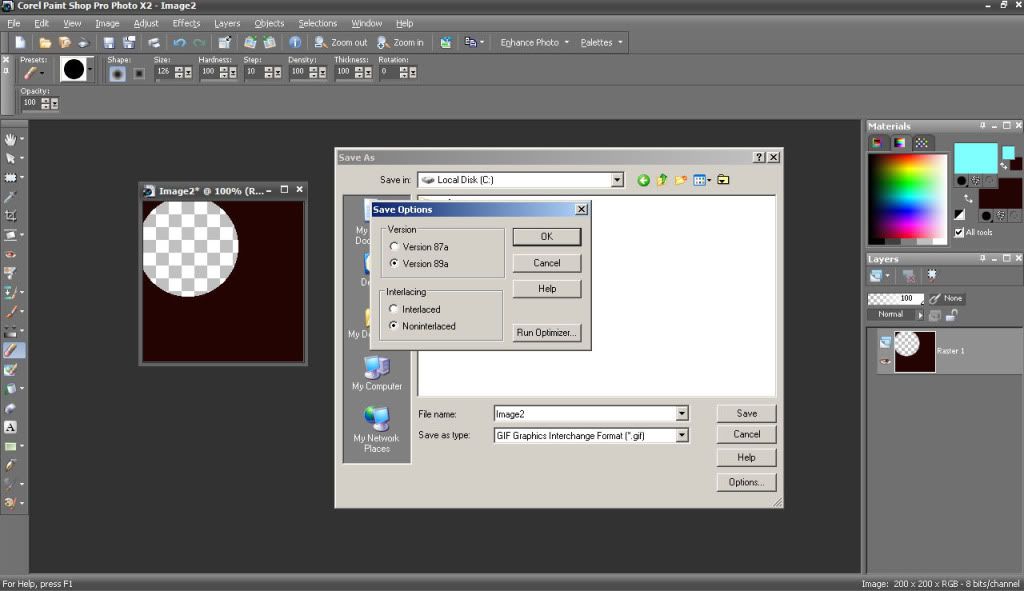
I'm not familiar with GIMP, but in Paint Shop Pro I have to run the optimizer while saving to get a transparency to stick. So, I "Save As", click "Options", and then click "Run Optimizer". If everything looks right, then I save in the optimizer.

There may be an easier way to do it, but I don't deal with transparencies all that often so it's not a big deal to me to take a couple of extra steps.


ETA: Good to know about resizing.
  #5  
Old 08-17-2009, 11:57 PM
Dr. Zeppers's Avatar
Dr. Zeppers Dr. Zeppers is offline
Drunken Pirate Master
Dr. Zeppers's Primary Pirate Info

Join Date: Feb 2008
Location: Doing that voodoo that I do so well..
Posts: 4,162
My Mood: Piraty
Dr. Zeppers must be getting help from Tia Dalma to get this farDr. Zeppers must be getting help from Tia Dalma to get this farDr. Zeppers must be getting help from Tia Dalma to get this farDr. Zeppers must be getting help from Tia Dalma to get this farDr. Zeppers must be getting help from Tia Dalma to get this farDr. Zeppers must be getting help from Tia Dalma to get this far
Quote:
Originally Posted by Aliese View Post
I'm not familiar with GIMP, but in Paint Shop Pro I have to run the optimizer while saving to get a transparency to stick. So, I "Save As", click "Options", and then click "Run Optimizer". If everything looks right, then I save in the optimizer.

There may be an easier way to do it, but I don't deal with transparencies all that often so it's not a big deal to me to take a couple of extra steps.
Hmmm I think your talking about the Animation Shop utility distributed with PSP, unless they integrated it in one of the last few versions.
It has the optimizer you speak of, never seen it actually in PSP, just trying to help in case someone gets confused looking.

In PSP 10 on down (dont know about the latest)
GIF is limited to 256 colors and PSP requires a color to be set as transparent, as there is no 'true' transparency in a GIF, it simply instructs viewers to not display the one color. There is should be no optimizer required for single frame images, as they are used to remove extra repeated data in a multiframed (animated) GIF.

PNG supports 16 million colors, including transparency, PSP will save any transparency in the image automatically upon saving a PNG file.

I would be willing to bet the OPs issue is the board resizing their image and thereby losing the transparency as Jack mentioned. Uploading it at 64x64 or smaller should resolve the problem.
__________________
  #6  
Old 08-18-2009, 12:14 AM
Aliese's Avatar
Aliese Aliese is offline
AKA Piper/Sawyer/Laurel
Aliese's Primary Pirate Info

Join Date: Apr 2008
Location: With My Beardies
Posts: 1,120
My Mood: Nerdy
Aliese is a buccaneerAliese is a buccaneerAliese is a buccaneer
Quote:
Originally Posted by Dr. Zeppers View Post
Hmmm I think your talking about the Animation Shop utility distributed with PSP, unless they integrated it in one of the last few versions.
It has the optimizer you speak of, never seen it actually in PSP, just trying to help in case someone gets confused looking.

In PSP 10 on down (dont know about the latest)
GIF is limited to 256 colors and PSP requires a color to be set as transparent, as there is no 'true' transparency in a GIF, it simply instructs viewers to not display the one color. There is should be no optimizer required for single frame images, as they are used to remove extra repeated data in a multiframed (animated) GIF.
I do have Animation Shop on my computer, but I'm working in PSP (I have versions 7-12 [er, "X2"]).

ETA: Here's a screenie:
Click the image to view the full version

It never occurred to me that it might be a part of another program (if it's not on yours, that must be the case), but in any case, it's there on mine.
  #7  
Old 08-18-2009, 12:54 AM
Dr. Zeppers's Avatar
Dr. Zeppers Dr. Zeppers is offline
Drunken Pirate Master
Dr. Zeppers's Primary Pirate Info

Join Date: Feb 2008
Location: Doing that voodoo that I do so well..
Posts: 4,162
My Mood: Piraty
Dr. Zeppers must be getting help from Tia Dalma to get this farDr. Zeppers must be getting help from Tia Dalma to get this farDr. Zeppers must be getting help from Tia Dalma to get this farDr. Zeppers must be getting help from Tia Dalma to get this farDr. Zeppers must be getting help from Tia Dalma to get this farDr. Zeppers must be getting help from Tia Dalma to get this far
Ok, guess it does have an optimizer.
Ive used PSP since version 4 creating transparent gifs for my websites for years, and never ever used it.
For the record? Its not required for any form of image transparency in PSP.
__________________
  #8  
Old 08-18-2009, 01:09 AM
Aliese's Avatar
Aliese Aliese is offline
AKA Piper/Sawyer/Laurel
Aliese's Primary Pirate Info

Join Date: Apr 2008
Location: With My Beardies
Posts: 1,120
My Mood: Nerdy
Aliese is a buccaneerAliese is a buccaneerAliese is a buccaneer
Quote:
Originally Posted by Dr. Zeppers View Post
For the record? Its not required for any form of image transparency in PSP.
I don't want to stray too OT, but I'm curious how do you do it? As I said, I rarely deal with transparencies, but the optimizer was the first way I got it to work... Ohhh, do you use Image > Palette > Set Palette Transparency?

Last edited by Aliese; 08-18-2009 at 01:32 AM.. Reason: I can't spell.
  #9  
Old 08-18-2009, 01:14 AM
Dr. Zeppers's Avatar
Dr. Zeppers Dr. Zeppers is offline
Drunken Pirate Master
Dr. Zeppers's Primary Pirate Info

Join Date: Feb 2008
Location: Doing that voodoo that I do so well..
Posts: 4,162
My Mood: Piraty
Dr. Zeppers must be getting help from Tia Dalma to get this farDr. Zeppers must be getting help from Tia Dalma to get this farDr. Zeppers must be getting help from Tia Dalma to get this farDr. Zeppers must be getting help from Tia Dalma to get this farDr. Zeppers must be getting help from Tia Dalma to get this farDr. Zeppers must be getting help from Tia Dalma to get this far
Quote:
Originally Posted by Aliese View Post
I don't want to stray too OT, but I'm curious how do you do it? As I said, I rarely deal with transparencies, but the optimizer was the first way I got it to work... Ohhh, do you use Image > Palette > Set Pallet Transparency?
Yes! Thats it!
Lets me use the eye dropper to choose my transparent color on the image, and then I can click preview to see if its clean.
However ive switched to PNG now, more colors, and easier because I dont even need to do that pallete thing! I just literally delete all the data making it transparent.
If your "layer" is called "background" you cannot do this, you have to convert the "background" layer to a Raster layer first in PSP.

Heck I might try the optimizer now! hehe
__________________
  #10  
Old 08-18-2009, 03:15 AM
Erich Uchiha's Avatar
Erich Uchiha Erich Uchiha is offline
PNC Circle Of Trust Rep
Erich Uchiha's Primary Pirate Info

Join Date: Jun 2008
Location: The Caribbean, luv!
Posts: 642
My Mood: JarODirt
Erich Uchiha is scurvy dog
Quote:
Originally Posted by Jack I View Post
A few important things go into making an image transparent.


I noticed that your current avatar is in your gallery and is 276 x 294. That's the reason your avatar isn't showing up transparent. You'll need to pull it back up, resize it to 64x64, then try uploading it.

Thanks a BUNCH Jack! Always can count on you to know your Computer Art!


Posting Rules
You may not post new threads
You may not post replies
You may not post attachments
You may not edit your posts

BB code is On
Smilies are On
[IMG] code is On
HTML code is Off

Forum Jump


All times are GMT. The time now is 07:32 PM.

POF on Facebook

Powered by vBulletin® Version 3.8.11
Copyright ©2000 - 2026, vBulletin Solutions Inc.